
Chat AI: Ask Agent Anything
Deep Flow AppsProductivity
4.511.20K Reviews
- Version
- 3.6.0
- Installs
- 10.00M
- Age Rating
- Everyone
Screenshots


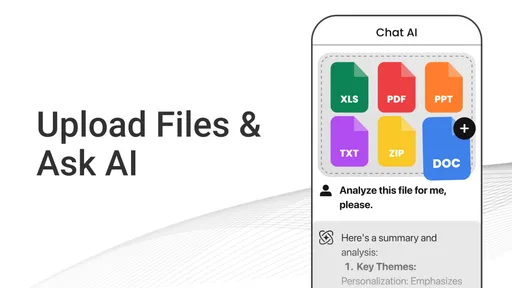
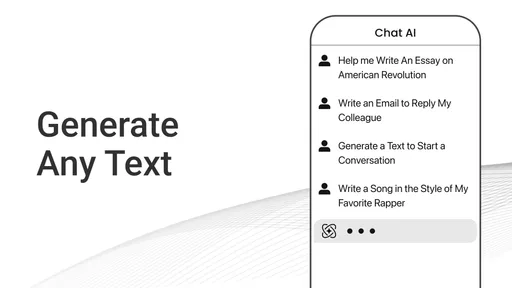
Our Review of Chat AI: Ask Agent Anything
 Analysis by Appyee
I judge an AI chat app less by whether it can produce a dazzling answer and more by whether it helps me get a useful result without making me work around it. Ask AI - Chat with AI Chatbot is built around that simple loop: type a question, read a response, then steer the conversation until it fits what you need. That makes it approachable for quick help, though the quality of the result still depends on how clearly you ask and whether you check important claims.
A practical first routine
My most reliable way to use a chatbot is to give it a concrete task rather than a broad topic. Instead of asking for advice about a busy day, I might describe the commitments I need to juggle and ask for a short plan with the most important item first. If the answer is too general, I follow up with a constraint, such as asking for fewer steps or a more casual tone. That back-and-forth is where a chat format earns its place.
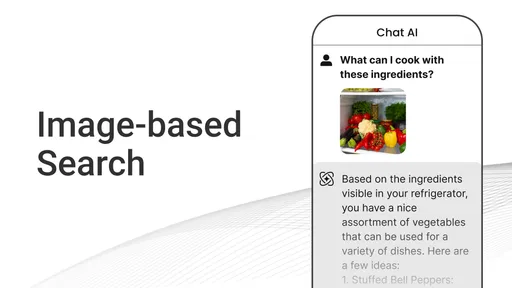
For a realistic everyday example, imagine I have a few ingredients at home and little time to decide what to cook. I can list what I have, ask for a simple meal idea, then request a version that uses fewer steps. I would still check cooking details myself, but the app can help me get past the blank-page moment. The same approach can help draft a polite message, explain an unfamiliar term, or turn rough notes into a clearer outline.
What to check before settling into a habit
The app is free to install, and optional in-app purchases range from $1.49 to $149.99 per item. I would check the purchase screen carefully before committing to anything, especially if I only need occasional answers. The listed Everyone age rating is useful context for families, but it does not make every AI response automatically suitable for every situation; I would still guide younger users and review answers that matter.
Ask AI is made by Deep Flow Apps, and its store summary describes a chatbot and smart assistant powered by multiple AI models. That multi-model framing is relevant because different systems can approach the same prompt differently, but I would not treat a confident tone as proof that an answer is correct. For health, legal, financial, or other consequential decisions, use the response as a starting point and confirm it with a qualified source.
Getting Started with Ask AI
First things first, downloading Ask AI - Chat with AI Chatbot was a breeze. Available on both Android and iOS, the app doesn’t take up much space, which is a win for those of us constantly battling with storage issues. Once installed, the setup was super straightforward. You just sign in, and you’re good to go!
The interface is sleek and minimalistic, which I loved. No unnecessary clutter, just you and your AI buddy ready to chat. It’s almost like texting a friend, and the developers have done a stellar job of making it user-friendly.
Diving into the Chat Experience
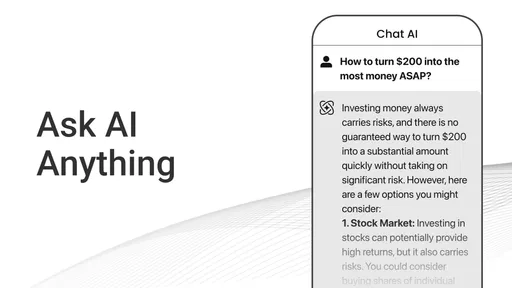
Now, let’s talk about the chat experience itself. The AI is impressively responsive. I threw a variety of questions its way, from general knowledge to more specific inquiries about current events, and it handled them like a pro. It even cracked a few jokes, which had me chuckling. This AI doesn’t just respond; it converses.
One thing that stood out is how the AI adapts to your style. If you’re casual, it mirrors that vibe, and if you’re formal, it switches gears to match. This makes the conversations feel natural and engaging.
Features Worth Highlighting
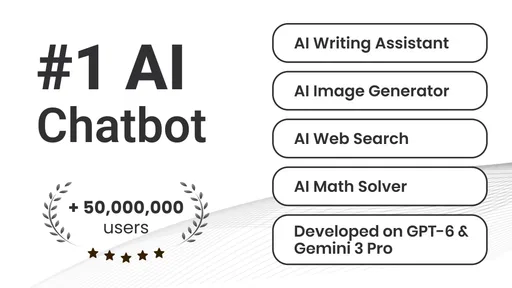
Let’s break down some of the features that make this app a standout:
- Personalization: The AI learns from your interactions, tailoring responses to better suit your preferences over time.
- Multi-language Support: It supports various languages, so you can chat in your preferred tongue, which is a major plus for non-English speakers.
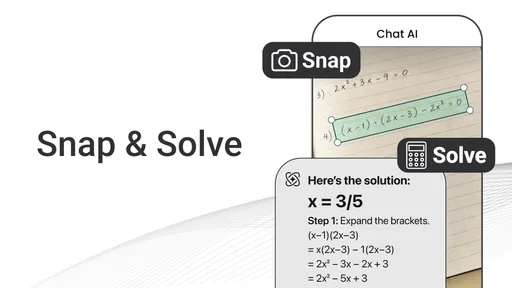
- Versatility: Whether you need help with a math problem, want to learn a new recipe, or just need a pep talk, this app has got you covered.
These features add layers of depth to the app, making it more than just a novelty.
Faster prompts, better answers
I get more consistent help when I treat prompts as small reusable templates. For writing, I include the audience, purpose, and desired length; for planning, I include the fixed commitments and what can move. That extra context often saves a follow-up. A useful habit is to ask for a first draft, then request one targeted change at a time rather than piling several vague instructions into a single message.
For learning, I ask the assistant to explain a concept in plain language, then give me one example and one question to check whether I understood it. This turns a passive answer into a quick study session. For a tricky explanation, I may ask it to identify assumptions or show the reasoning in steps, while remembering that a fluent explanation can still contain errors.
The app’s multiple-model approach also makes comparison a sensible tactic when an answer feels shaky or unusually important. I can rephrase the question or seek a second response, then look for agreement and differences rather than accepting the first result as definitive. This is most useful for brainstorming and explanations; it is not a substitute for checking facts against dependable references.
Choosing it over other ways to get help
Compared with a conventional web search, a chat assistant is better at reshaping an answer around follow-up requests: I can ask for a shorter explanation, a different tone, or an example without starting over. Search is usually the better choice when I need to inspect original sources, verify a recent detail, or compare several specific pages. I use the two approaches for different jobs instead of expecting a chatbot to replace search entirely.
Compared with a notes app or a task manager, Ask AI can help me think through wording and options, but it is not the place I would rely on as the sole record of deadlines or commitments. I keep lasting information in the tool designed to store it and use chat to draft, clarify, or brainstorm. That separation prevents a useful conversation from becoming a messy substitute for an organized system.
This is a good fit for curious users, students seeking plain-language explanations, and anyone who regularly wants a first draft or a fresh angle. It is less suitable for people who need guaranteed accuracy, source-first research, or a dedicated workflow for tracking projects. If I am asking something high-stakes, I would choose a trusted professional or primary reference over any chatbot.
Behind the Tech
Without getting too technical, the app uses advanced AI algorithms to understand and process queries. This isn’t just some pre-set script. It’s designed to understand context and provide meaningful responses. The technology is continuously updated, which means it’s always learning and improving.
Security is another biggie. The app promises privacy, with no data being stored without consent. In today’s world, that’s a huge relief and something that gives this app an edge.
Where I keep expectations grounded
Conversation is convenient, but it can also make uncertain information sound settled. I avoid sharing sensitive personal details unless I have checked the app’s current privacy terms and settings for myself. I also separate brainstorming from fact-checking: a suggestion can be creatively useful even when I would not trust it as an authority. That distinction matters more than how natural the exchange feels.
Another practical limit is that a chat can drift if I keep adding unrelated questions to one thread. When the task changes, I start with a fresh, self-contained prompt rather than assuming the assistant will keep every detail straight. If a response misses the point, I restate the goal and constraints directly; repeatedly saying “try again” without explaining what needs to change rarely gives me the control I want.
The app is listed as free, with optional purchases, so I would begin with the no-cost experience and decide whether it suits my routine before paying for anything. Its current version is 3.3.9, and it requires Android 7.0 or later. Those details help Android users judge basic compatibility, while iOS users should check the requirements shown on their device’s store page.
Final Thoughts
All in all, Ask AI - Chat with AI Chatbot is a nifty little app that packs a punch. It’s like having a pocket-sized companion ready to chat whenever you are. Whether you’re looking for a conversational partner, a virtual assistant, or just a bit of fun, this app ticks all the boxes.
So, if you’re curious and want to give it a go, it’s definitely worth the download. Just be prepared to be amazed by how smart your new AI friend can be!
My verdict after building a routine
Ask AI has a strong case as an everyday thinking partner, especially when I need to get from an unclear idea to a workable draft or plan. It has an average rating of 4.4 from around 1.1 million ratings, with over 10 million installs and around 11,000 written reviews. Those figures suggest that it has reached a broad audience, but they do not tell me whether it will suit my particular habits; the best test is whether its replies are useful for the tasks I actually bring to it.
For me, the mastery move is not a secret setting or a clever shortcut. It is a repeatable habit: give the assistant the relevant context, ask for a specific form of help, refine one thing at a time, and verify anything consequential. With that approach, it can be a handy companion for drafting, learning, and everyday decisions. If I need sourced research, reliable record-keeping, or professional guidance, I reach for a more appropriate tool instead.
Verdict
Strengths of Chat AI: Ask Agent Anything
- Intuitive and user-friendly interface.
- Quick and accurate responses.
- Wide range of topics covered.
- Customizable chat settings.
- Frequent updates and improvements.
Limitations of Chat AI: Ask Agent Anything
- Requires internet connection.
- Limited free usage before subscription.
- Occasional repeated answers.
- No voice interaction feature.
- Ads in the free version.
Other Releases by Deep Flow Apps
View All
Learn English, Spanish: Learna
Education4.6

IQ Masters - Brain Games
Education4.2

Nerd AI - Tutor & Math Helper
Education4.6

Retake AI: Face & Photo Editor
Photography3.7
Similar Picks in This Category
View All
Google Calendar
Google LLC4.6

Google Drive
Google LLC4.3

Google Assistant
Google LLC3.9

Microsoft OneDrive
Microsoft Corporation4.6

Samsung Calendar
Samsung Electronics Co., Ltd.4.1

Microsoft OneNote: Save Notes
Microsoft Corporation4.6
Frequently Asked Questions
What features does Ask AI - Chat with AI Chatbot offer?
Ask AI provides users with a comprehensive set of features, including natural language processing for seamless communication, personalized responses, and learning capabilities to improve over time. It also offers voice interaction, making it versatile for different user preferences. The app aims to deliver an intuitive and efficient chatbot experience.
Is Ask AI - Chat with AI Chatbot available on both Android and iOS?
Yes, Ask AI is available for download on both Android and iOS platforms. This ensures a wide range of users can access its features regardless of their device preference. You can find the app on the Google Play Store and Apple App Store, making it easy to install and start using immediately.
How does Ask AI ensure user privacy and data security?
Ask AI prioritizes user privacy and data security by implementing robust encryption protocols and adhering to strict privacy policies. The app ensures that user interactions and data are protected and not shared with third parties without consent. Regular updates also include security enhancements to maintain user trust.
What are the pros and cons of using Ask AI - Chat with AI Chatbot?
Pros include its intuitive interface, adaptive learning, and ability to handle a wide range of queries effectively. However, some users might find occasional inaccuracies in responses due to the evolving nature of AI. Additionally, the app requires a stable internet connection, which might be a limitation for some users.
Is there a cost associated with using Ask AI - Chat with AI Chatbot?
Ask AI offers a free version with basic features, making it accessible for most users. However, there are premium options available that provide enhanced functionalities and an ad-free experience. Pricing details can be found within the app, allowing users to choose a plan that best suits their needs.
